
Document signing and evidence
Sign documents with proof of who signed and when.
Prepare a PDF, decide who fills in, approves and signs, and follow it to the end. You keep the signed PDF and a record of how each person was identified and signed.




Four steps: prepare, assign, sign, keep.
Anna and Mark fill in and sign; Rita signs last; the agency gets a copy.
Prepare
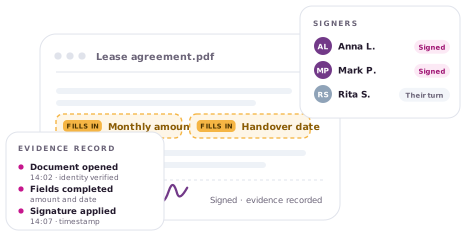
Upload Lease agreement.pdf as you have it. Place the two fields and the three signature places on the page.
Assign
Anna fills in the monthly amount and signs; Mark fills in the handover date and signs; Rita signs last; the agency receives a copy.
Sign
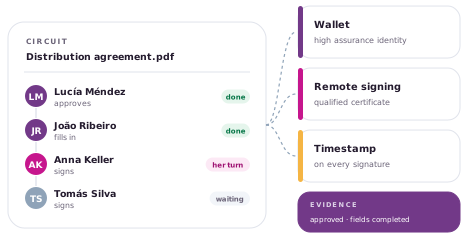
Each person gets a personal link, reads in the browser and acts on their turn: by consent, or with their own certificate.
Keep
You keep the signed PDF, the completion report and the evidence record; the agency gets its copy; the record can be checked without us.
By consent, or with their own certificate.
Two ways to sign. Before either, the person is identified with the method the sender chose: an email, a code sent another way, or their country’s digital identity or wallet, at the level the sender requires. The record keeps how it happened.
| By consent | With their own certificate | |
|---|---|---|
| How the person is identified | By email, by a code sent another way, or with their country’s digital identity or wallet, at the level the sender requires. | By the certificate itself, issued to them by a trusted provider in their country; the sender can also require an identification step first. |
| What they do to sign | Read, and agree. | Authorize the provider to sign exactly this document; the key never leaves it. |
| What is recorded | The identification, its level, the agreement, the time. | The signature embedded in the PDF, the certificate, the time. |
| What it depends on | The identity methods enabled for the account; the country’s digital identity when the account has it. | A certificate service available in the signer’s country. |
Most documents aren’t signed first: they’re filled in first.
The lease needs a monthly amount and a handover date before it can be signed. Anna, the tenant, fills in the amount; Mark, the guarantor, fills in the date; each one signs their part, and Rita, the landlord, signs last.
- Each completes their assigned fields. Fields are assigned to participants for completion.
- With rules. Configure required fields and validate their values as part of the signing process.
- And it stays in the document. Completed values become part of the PDF revision being signed.
Besides the signature itself, a record of how it happened.
A signature made with a certificate proves itself inside the PDF. The record adds what the PDF alone does not say: how each person was identified, what each one saw, and in what order; for a signature by consent, the record is the proof. Each signature covers the revision that person saw: Anna signs the lease with her amount; Mark completes the date and signs the next revision; the record keeps both, and who saw which.
- Chained. Linked events help detect changes to the record.
- Timestamped when configured. An external timestamp provides time evidence when that service is enabled and available.
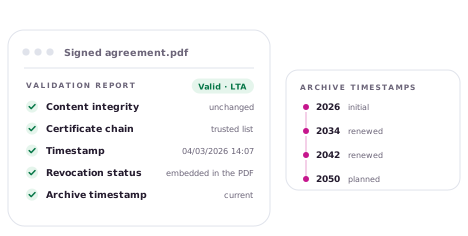
- Inspect the signatures. Check the PDF signatures with a compatible validator; results depend on its trust settings and the available evidence.
Evidence record · Lease agreement
Three results, and who gets which.
The signed PDF
The lease with every signature embedded in the standard way. The sender and every signer can download it; it opens in any reader and can be checked by any standard validator.
The completion report
One sealed page per circuit: participants, how each was identified, when each signed, and the hash of every file. The sender receives it; signers get it with their copy.
The evidence record
The chained log of everything that happened, exportable with the document and readable without the product. Kept by the sender; part of the delivery package.
From the web, or inside your own systems.
From the browser
A team uploads, prepares, sends and follows the document.
From your systems
Your CRM or ERP creates the document and names the signers; signed webhooks report progress and deliver the signed PDF and the report when it completes.
Three ways to run it: Shared service Dedicated cloud, on request Your own network, on requestIdentity and signing services depend on the installation.
One person, an organization, or your own installation, on request.
Individual is for one person who signs and sends. Business gives an organization its users, roles and brand. Tailored brings the same product to your own infrastructure.
Understand electronic signatures before choosing any tool.
What a signature proves and what it does not, why a timestamp matters, and what each country accepts. Three free books and the articles in Learn explain it in plain language.
If you want to see it running, the sandbox is open.
A demo account, a sample document, a signer that is you. Test data only.